
AVerMedia
  • Products
    • Webcams
      • 4K UHD
      • 1080 FULL HD
      • Kits
    • Capture/Converter
      • 4K Capture
      • 1080p60 Capture
      • AV / S Video Capture
      • DSLR / Camcorder capture
      • Video Converter
    • Audio
      • Speakerphones
      • Soundbars
      • Microphones
      • Wireless Microphone
      • Accessories
    • Control Center
      • Creator Central
    • Video Bar
      • Mingle Bar
    • สถานีขยายการสตรีมมิ่ง
      • ผลิตภัณฑ์วิดีโอ
      • ผลิตภัณฑ์เสียง
    • ซอฟต์แวร์
      • ซอฟต์แวร์สตรีมมิ่ง
  • Solutions
    • Workspaces
      • Products of the Month
      • Game Streamer
      • Video Content Creator
      • Work From Home
      • Education
      • How To
      • Corporate
  • Support
    • Support
      • Downloads & FAQ
      • Technical Support
      • Warranty & RMA Services
      • Where to Buy
      • การรับรอง
  • Store
  • Store
  • Edge AI Solutions
  • เกี่ยวกับ AVerMedia
    • เกี่ยวกับ AVerMedia
      • เกี่ยวกับ AVerMedia
      • ติดต่อเรา
      • 投資人關係
      • ความรับผิดชอบต่อสังคม
      • Recruiting
  • Account
  • Search
  • Language
  • ติดต่อเรา
Mobile nav
SUPPORT
  • คำถามที่ถามบ่อยและการสนับสนุนทางเทคนิค'
  • การสนับสนุนทางเทคนิค
  • การรับประกันและบริการ RMA
  • สถานที่จำหน่าย
  • Certification
    • Barco
    • Chromebook
    • Zoom

Why Is My PC Game Audio Not Captured? Dual-PC Setup Instructions


You can connect the HDMI cable from the HDMI out port on the capture card to your gaming monitor if the monitor has a built-in speaker. 

You could see the below example:
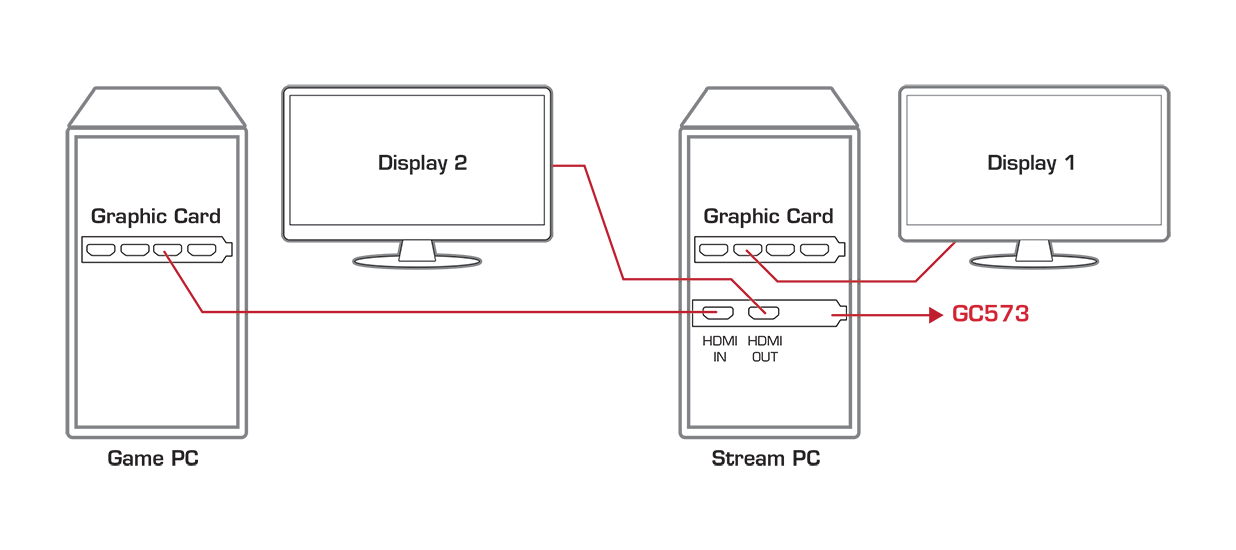


For alternative Dual-PC setup, you could follow the below video:


 If you want to play audio simultaneously through both your headset (Gaming PC) and the HDMI output (Streaming PC), if you are using a GC553G2 or GC551G2, you can connect an audio cable from the gaming PC’s Line-out port to the Line-in port on the GC553G2 (game icon port) or GC551G2. Then, connect your headset to the Line-out port on the capture device. With this setup, you can monitor the game audio while also sending the game PC’s audio to the capture device (and your streaming software).


If not, please use voicemeeter and refer to this video


2025


  • เกี่ยวกับเรา
    • เกี่ยวกับ AVerMedia
    • ติดต่อเรา
    • 投資人關係
    • ความรับผิดชอบต่อสังคม
  • สื่อ
    • แถลงข่าว
    • บทความรีวิวสื่อ
    • วิดีโอรีวิวจากครีเอเตอร์
    • วิดีโอผลิตภัณฑ์อย่างเป็นทางการ
    • วิดีโอสอนการใช้ผลิตภัณฑ์
    • รางวัล
  • การสนับสนุน
    • คำถามที่ถามบ่อยและการสนับสนุนทางเทคนิค'
    • การสนับสนุนทางเทคนิค
    • การรับประกันและบริการ RMA
    • สถานที่จำหน่าย
    • EOL
  • อื่นๆ
    • Blog
    • Workspace
    • Store
    • Store
    • สอบถามข้อมูลทางธุรกิจ
    • AVerMedia Member Club
    • พอร์ทัลพาร์ทเนอร์ AVerMedia
    • พาร์ทเนอร์เชิงกลยุทธ์
    • TAA Compliance
    • NDAA Compliance
    • นโยบายความเป็นส่วนตัว
    • ข้อกำหนดการใช้งาน
fb
linkedin
twitter
youtube
reddit
Language
Copyright © AVerMedia.
  • Products
    • Webcams
      • 4K UHD
      • 1080 FULL HD
      • Kits
    • Capture/Converter
      • 4K Capture
      • 1080p60 Capture
      • AV / S Video Capture
      • DSLR / Camcorder capture
      • Video Converter
    • Audio
      • Speakerphones
      • Soundbars
      • Microphones
      • Wireless Microphone
      • Accessories
    • Control Center
      • Creator Central
    • Video Bar
      • Mingle Bar
    • สถานีขยายการสตรีมมิ่ง
      • ผลิตภัณฑ์วิดีโอ
      • ผลิตภัณฑ์เสียง
    • ซอฟต์แวร์
      • ซอฟต์แวร์สตรีมมิ่ง
  • Solutions
    • Workspaces
      • Products of the Month
      • Game Streamer
      • Video Content Creator
      • Work From Home
      • Education
      • How To
      • Corporate
  • Support
    • Support
      • Downloads & FAQ
      • Technical Support
      • Warranty & RMA Services
      • Where to Buy
      • การรับรอง
  • Store
  • Store
  • Edge AI Solutions
  • เกี่ยวกับ AVerMedia
    • เกี่ยวกับ AVerMedia
      • เกี่ยวกับ AVerMedia
      • ติดต่อเรา
      • 投資人關係
      • ความรับผิดชอบต่อสังคม
      • Recruiting
Language