
AVerMedia
  • Produits
    • Webcams
      • 4K UHD
      • 1080 FULL HD
      • Kits
    • Capturez
      • 4K Capturez
      • 1080p60 Capturez
      • AV / S Video Capturez
      • DSLR /CAMCODE CAPTURE
      • Video Converter
    • Audio
      • Haut-parleurs
      • Soundbars
      • Micros
      • Micro sans-fil
      • Accessoires
    • Centre de contrôle
      • Centre de création
    • Video Bar
      • Mingle Bar
    • Station d'Extension de Streaming
      • Produit Vidéo
      • Produit Audio
    • Logiciels
      • Logiciel de Streaming
  • Espace de travail
    • Workspaces
      • Products of the Month
      • Game Streamer
      • Video Content Creator
      • Work From Home
      • Education
      • How To
      • Corporate
  • Support
    • Support
      • Downloads & FAQ
      • Technical Support
      • Warranty & RMA Services
      • Where to Buy
      • Certification
  • Boutique
  • Store
  • Systèmes d'IA intégrés
  • À propos d’AVerMedia
    • À propos d’AVerMedia
      • À propos d’AVerMedia
      • Contact Us
      • 投資人關係
      • ESG et RSE
      • Recruiting
  • Account
  • Search
  • Language
  • Contacter
Mobile nav

Streamer ULTRA - GC531

Aperçu général Caractéristiques Questions et réponses Télécharger
Où acheter

GC531

Streamer Ultra

Les vraies couleurs révélées dans votre stream

  • Capture 4K30

    4K30 Capture

    Capture et diffusion 4K30

  • RGB24

    RGB24

    Images aux couleurs réelles

  • Audiovisuel professionnel

    Audiovisuel professionnel

    Capture d'image non compressée

  • Commerce en direct

    Commerce en direct

    Couleurs réalistes pour une qualité DSLR

  • Streaming de jeux

    Streaming de jeux

    Idéal pour les jeux AAA populaires

Découvrez l'éclat de la 4K dans chaque image

Le STREAMER ULTRA GC531 capture des vidéos 4K nettes et détaillées avec une reproduction fidèle des couleurs, aidant les streamers à donner vie à leur contenu. Que vous diffusiez en direct, enregistriez ou créiez du contenu pour la post-production, le GC531 vous offre la flexibilité de créer en toute confiance.
Conçu pour des performances fiables

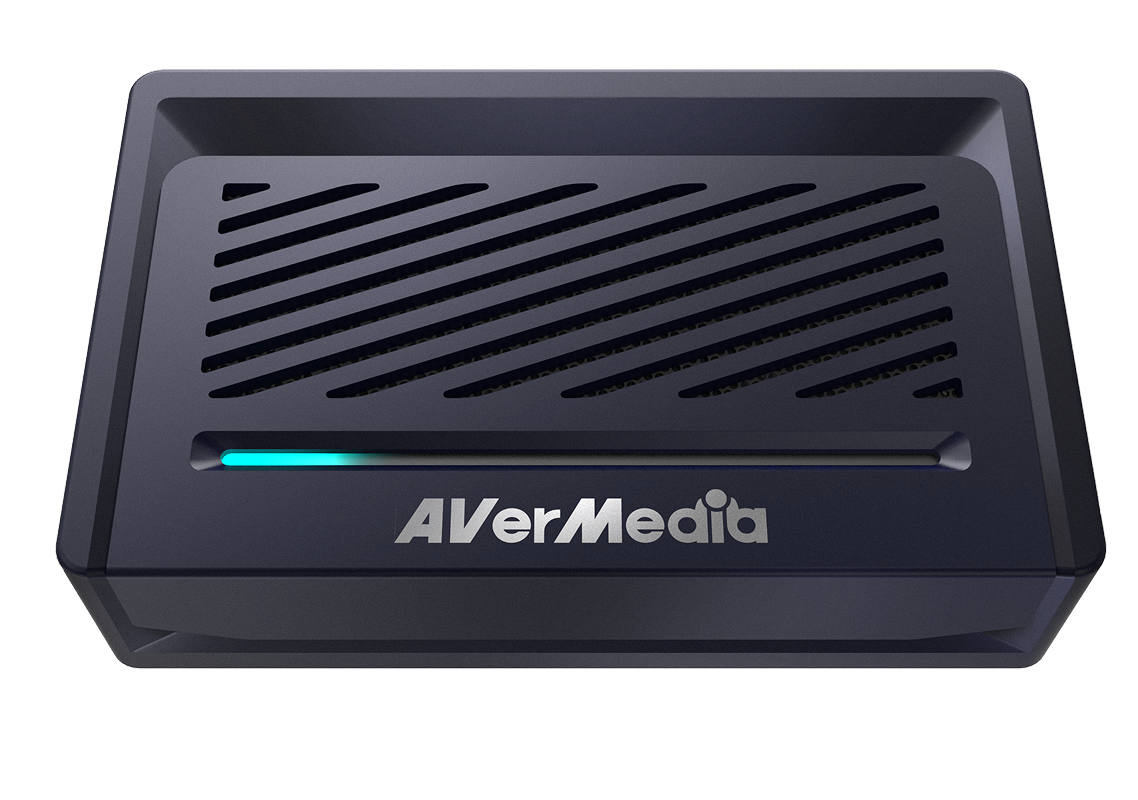
Fabriqué avec un boîtier en alliage amélioré et une grille ventilée, le GC531 allie durabilité et dissipation thermique efficace. Conçu pour maintenir des performances fiables lors de sessions de streaming et d'enregistrement prolongées, il aide à maintenir la fluidité de votre flux de travail avec une transmission vidéo stable et une qualité de capture constante.

Des couleurs réalistes en 2K30

Profitez de visuels vibrants et naturels avec la prise en charge des couleurs RGB24 jusqu'à une résolution de 2K30. Reproduisez les couleurs avec clarté et cohérence pour des streams et des enregistrements captivants.

Streaming Center
Streaming Center

Streaming Center -
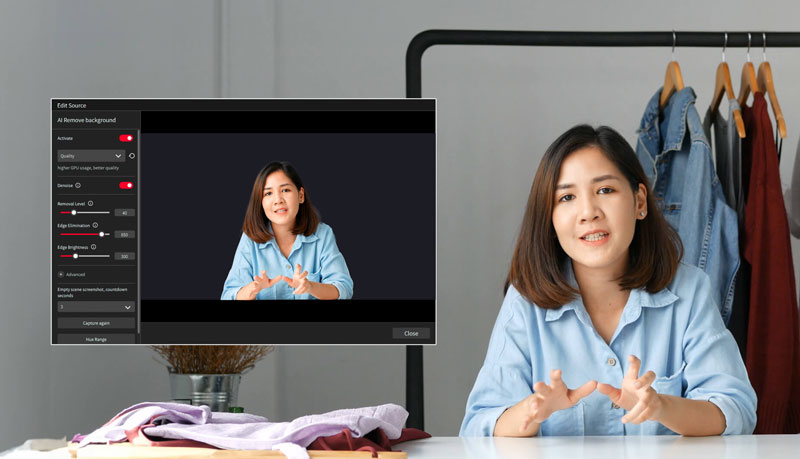
Streamez plus intelligemment, pas plus difficilement

AVerMedia Streaming Center est un outil tout-en-un pratique qui combine la capture vidéo et les commandes de la caméra dans un logiciel puissant. Il rationalise le flux de travail des utilisateurs et facilite le streaming en direct. Pour plus d'informations, cliquez ici .

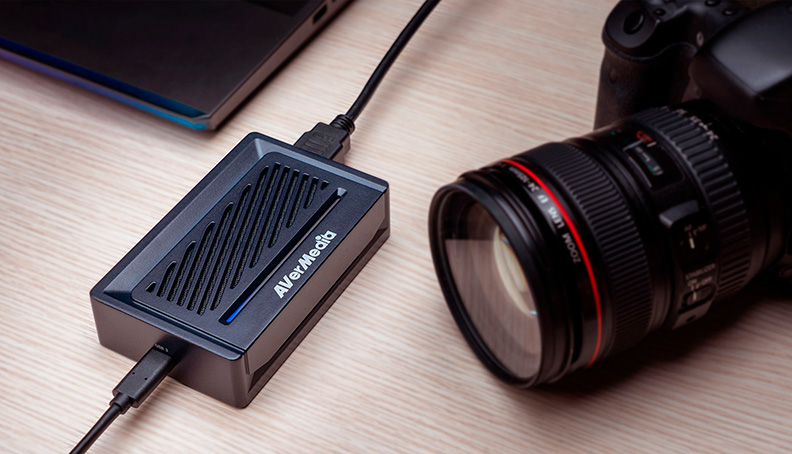
Prise en charge universelle des caméras

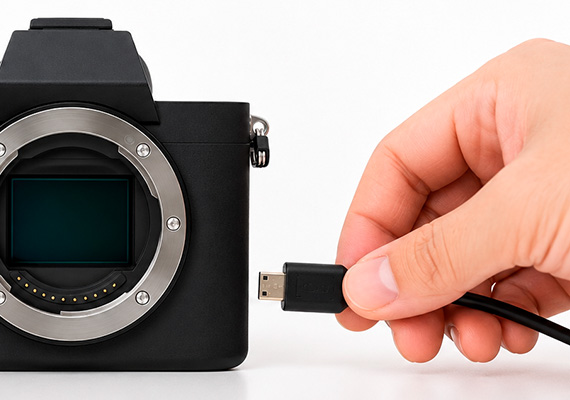
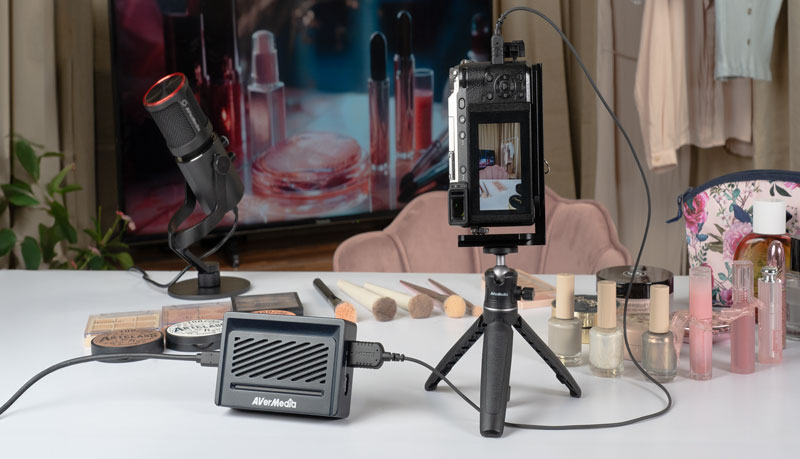
Conçu pour le commerce en direct professionnel et la production cinématographique, le GC531 s'intègre parfaitement à une large gamme de caméras de pointe. Profitez d'un déploiement flexible et d'une compatibilité fiable avec les systèmes de caméras les plus fiables d'aujourd'hui.
Streaming Center

Configuration rationalisée

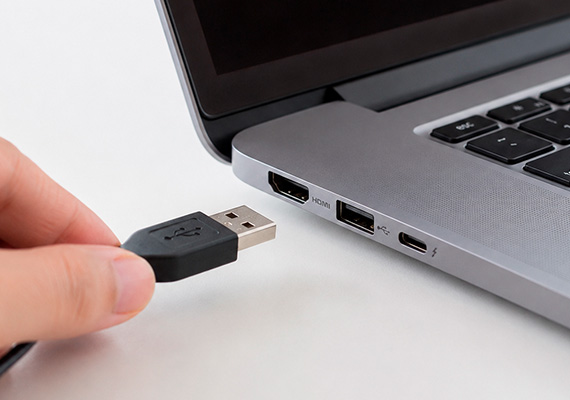
Utilisant la technologie UVC avancée, le STREAMER ULTRA rationalise la configuration sur les systèmes Windows et Mac.
Connectez simplement votre GC531 à votre PC ou Mac, et il est prêt pour l'enregistrement et le streaming immédiats.

  • Connecter à l'ordinateur

  • Connecter à la caméra

  • Connecter au moniteur

  • Ajouter à l'application préférée
    Streaming Center

Spécifications Streamer ULTRA - GC531
  • Interface : USB 3.2 Gen 1 Type-C (5 Gbps)
  • Entrée & Sortie (Pass-through) : HDMI 2.0
  • Résolution de capture max : 2160p30, 1440p60, 1080p120, 1080p60 HDR
  • Résolution prise en charge : 2160p, 1440p, 1080p, 1080i, 720p, 576p, 480p (En savoir plus)
  • Résolution Pass-Through max : 2160p60, 1440p144, 1080p240, avec VRR, HDR
  • Format vidéo : RGB24, YUY2, NV12, P010
  • Dimensions (L x P x H) : 113 x 70 x 28 mm (4.44 x 2.76 x 1.10 in)
  • Poids : 192 g (6.77 oz)
Configuration requise Windows ® 10 x64 / 11 x64 ou version ultérieure
  • Ordinateur de bureau :
    - Intel ® Core™ i5-6XXX / AMD Ryzen™ 3 XXX ou supérieur
    - NVIDIA ® GTX 1060 / AMD RX 5700 ou supérieur
  • Ordinateur portable:
    - Intel ® Core™ i7-7700HQ + NVIDIA ® GeForce ® GTX 1050Ti ou supérieur
    - 8 Go de RAM recommandés (Double canal)

macOS 13 / 14 ou version ultérieure

Remarques :
Le GC531 ne prend pas en charge l'USB 2.0

  • Intel Core i7 quadricœur à 3,6 GHz
  • Radeon Pro 555 avec 2 Go de VRAM
  • 16 Go de mémoire DDR4 à 2400 MHz
Contenu de la boîte :
  • STREAMER ULTRA (GC531)
  • Câble USB 3.2 (Gen 1) Type-C vers Type-A
  • Câble HDMI 2.0
  • Guide de démarrage rapide

*Les spécifications sont sujettes à modification sans préavis..

Questions et réponses

Party Chat
Switch 2
Audio
Micro SD Card
VRR
Troubleshooting
疑難排解
Settings
MAC M1
How do I start to use the Device
Software Usability
Hardware usability
Features/Functions
OBS
Chromebook
Windows
Mac OS
セットアップ
セットアップ・仕様
接続機器・設定
4K / HDR対応
VRR対応
音声端子
仕様
仕様・ソフト
仕様・ソフト(コントロール部)
仕様・ソフト(ミキサー部)
ストレージ
(PCモード)仕様・ソフト
(単体モード)仕様・設定
録画
配信
実況
再生
再生・編集
編集
Mac対応
相性
動画編集ソフト
ファイル管理
アップロード
ソフト
購入前のお問合せ
F225本体・付属品
セットアップ、Wi-Fi接続
テレビ視聴、設定画面
録画、予約録画、録画再生
アプリ
番組表
通信
設定
その他
困った時は
更新
EOL All
Streaming
Capturing
All Topics
Recording
Storage
Indicator Light
File management
Voice Commentary
GameMate
Upload
Playback & Video Quality
Editing & Converter
Live Stream
Installation
Watching TV
Stream Engine
Comparison Chart
What is the supported passthrough and capture resolutions and frame rates for GC531? Why do I only see a black screen in the software preview with no error messages? Why is my preview video and audio out of sync/desync/audio latency or delay on Windows?(QR) Why is there no game audio in both the software preview and my recorded videos? In multiple scenes of OBS, how to fix black screen when use AVerMedia capture card ? Why is the audio stuttering, cracking, or choppy in the software preview? My capture device cannot be detected when it is connected to the android phone, but everything goes fine on the PC. How can I solve it? Device connection keeps saying no input signal, how can I fix it? (QR) What should I do if my USB capture device cannot be found?
Voir plus

Télécharger

RECentral(Mac)
Application
Application(macOS)
Application(Windows)
Assist Central
Assist Central Pro(Mac)
Assist Central Pro(Win)
CamEngine(Chrome)
CamEngine(Mac)
CamEngine(Win)
Certificates
Compatibility Tool
Connect(Mac)
Connect(Win)
Datasheet
Diagnosis Tool(Win)
Download Manager
Driver
Firmware
Firmware(Mac)
Firmware(Win)
Plugin(macOS)
Plugin(Win)
Quick Guide
RECentral (Win)
Streaming Center(Win)
User Manual
Utility
Utility (Chromebook)
Utility & FW(macOS)
Utility & FW(Windows)
Utility(macOS)
Utility(Windows)

Date : 2026-08-04 00:00:00

Quick Guide

Date : 2026-05-27 00:00:00

Version:AVerMedia Streaming Center (Win) v1.8.22.2

Purpose: Streaming & Recording

OS:Win10 x64, Win 11

Description:


1. Added support for Voice Mode.

2. Fixed an issue where the audio devices for GC573 and GC570D might function abnormally when no video input signal is detected.

3. Fixed an occasional audio loss issue when enabling microphone monitoring or switching profiles.

4. Fixed an occasional software hang issue during the first launch after a system reboot.

5. Optimized fullscreen playback and preview performance.

Date : 2026-02-03 00:00:00

Version:AVerMedia Streaming Center (Win) v1.7.4.1
Purpose: Streaming & Recording

OS:Win10 x64, Win 11

Description:

1. Kick CDN Support: Integrated support for Kick streaming.

2. Audio Monitoring: Enabled by default for all capture devices.

3. AV1 & NVIDIA Super Resolution: Now supported for recording and streaming.

   Supported Models: GC553G2, GC575, GC573, GC553Pro, GC551G2.

4. New Aspect Ratios: Added support for 21:9 ultra-wide recording and portrait (9:16) streaming.

5. HEVC Encoder Support:

    SDR → YouTube

    HDR → YouTube / RTMP

6. Bug Fixes:

    Resolved crashes during Alt+Tab switching and Snapshot usage.

    Fixed blurry visuals when capturing Discord.

7. Optimized startup to prevent occasional black screens and audio anomalies.


See the new features in action:

Date : 2025-12-22 00:00:00

Version: Assist Central Pro v4.0.80
Purpose: Configuration & Update
OS : macOS 15, macOS 26
Description: 
1. Added support for German, Spanish, Russian, French, Korean, and Thai interface languages.
2. Fixed an issue where some devices weren’t being detected or were showing up incorrectly.
3. Fixed an issue on macOS where GC313Pro couldn’t retrieve firmware version information correctly.

Date : 2025-12-22 00:00:00

Version: Assist Central Pro v4.0.80

Purpose: Configuration & Update

OS : Win10 x64,Win 11

Description: 

1. Added support for German, Spanish, Russian, French, Korean, and Thai interface languages.

2. Added PCIe information display to the GC573 settings page.

3. Fixed an issue where some devices weren’t being detected or were showing up incorrectly.

4. Fixed a rare issue where GC553G2 and GC575 lights couldn’t be controlled through Assist Central Pro on certain PCs.

Date : 2025-08-14 00:00:00

Version:AVerMedia Streaming Center (Win) v1.6.65.1
Purpose: Streaming & Recording

OS:Win10 x64, Win 11

Description:

New Features

1.Added support for zoom, screenshot, and full-screen preview for more flexible operation.

2.Added hotkey function to start streaming or quickly perform common actions with hotkey.

3.Added stream quality display and detailed streaming platform settings, including privacy options, for more precise control over streaming status.

4.Added HDR brightness adjustment for more refined image colors.

5.Added VSync toggle for a smoother viewing experience.


UI and Stability Improvements

Optimized UI interface, and improved audio monitoring function and overall stability.


See the new features in action:

Date : 2025-07-22 00:00:00

Version: Assist Central Pro v4.0.73
Purpose: Configuration & Update
OS : macOS 14, macOS 15
Description: 
1. Support for EDID Merge, Copy, and Internal mode changes has been added for the following models:
GC515, GC553G2, GC553Pro, GC575, GC571, GC573, GC570D
Support for EDID Merge and Internal mode changes has been added for GC551G2 (requires firmware ver. 1.2.6.1)  
*Note: For more information on EDID modes, refer to this FAQ
2. Fixed issue: When Nintendo Switch 2 was set to 1440p60
and when GC551G2 passthrough was connected to certain monitors, Assist Central Pro displayed incorrect input resolution.

Date : 2025-07-22 00:00:00

Version: Assist Central Pro v4.0.73
Purpose: Configuration & Update
OS : Win10 x64,Win 11
Description:
1. Support for EDID Merge, Copy, and Internal mode changes has been added for the following models:
GC515, GC553G2, GC553Pro, GC575, GC571, GC573, GC570D
Support for EDID Merge and Internal mode changes has been added for GC551G2 (requires firmware ver. 1.2.6.1) 
*Note: For more information on EDID modes, refer to this FAQ
2. Fixed issue: When Nitendo Switch 2 was set to 1440p60 and when GC551G2 passthrough was connected to certain monitors, Assist Central Pro displayed incorrect input resolution.

Date : 2025-07-10 00:00:00

Version: StreamingCenterPLUG V2.4.14

Purpose: Plugin for OBS Studio

OS:Win10 x64, Win11

Description: User Experience Optimization


Note: This plugin is designed for OBS Studio. You only need to install it if you plan to use OBS Studio with this plugin.

Date : 2025-02-13 00:00:00

Version: StreamingCenterPLUG V2.1.8

Purpose: Plugin for OBS Studio

OS:Win10 x64, Win11

Description:

1 Requires OBS Studio version 30.2 or later.

2 AVerMedia Center Upgrade: Includes AVerMedia features and works within OBS Studio.

3 Supported Devices: GC553Pro, GC553G2, GC575, GC515, GC535, GC531.

4  Supports 5.1 Multichannel Audio Capture: GC553Pro, GC553G2 (Firmware v1.0.7.7 or later), GC575 (Firmware v1.1.6.12 or later)


Note: This plugin is designed for OBS Studio. You only need to install it if you plan to use OBS Studio with this plugin.


Voir plus
×
  • Qui sommes-nous ?
    • À propos d\'AVerMedia
    • Contact Us
    • 投資人關係
    • ESG et RSE
  • Médias
    • Informations et presse
    • Articles de Critique des Médias
    • Vidéos d'Avis des Créateur
    • Vidéos Officielles du Produit
    • Vidéos Tutorielles du Produit
    • Récompenses
  • Assistance
    • Téléchargements & FAQ
    • Soporte Técnico
    • Garantie et services
    • Où acheter ?
    • EOL
  • Autre
    • Blog
    • Espace de travail
    • Store
    • Store
    • Consulta Profesional
    • Club Membres AVerMedia
    • Portail Partenaires AVerMedia
    • Partenaire Stratégique
    • TAA Compliance
    • NDAA Compliance
    • Engagement de confidentialité
    • Conditions d’utilisation
    • MEET ELENA
    • Cookie Settings
fb
linkedin
twitter
youtube
reddit
Language
Copyright © AVerMedia.
  • Produits
    • Webcams
      • 4K UHD
      • 1080 FULL HD
      • Kits
    • Capturez
      • 4K Capturez
      • 1080p60 Capturez
      • AV / S Video Capturez
      • DSLR /CAMCODE CAPTURE
      • Video Converter
    • Audio
      • Haut-parleurs
      • Soundbars
      • Micros
      • Micro sans-fil
      • Accessoires
    • Centre de contrôle
      • Centre de création
    • Video Bar
      • Mingle Bar
    • Station d'Extension de Streaming
      • Produit Vidéo
      • Produit Audio
    • Logiciels
      • Logiciel de Streaming
  • Espace de travail
    • Workspaces
      • Products of the Month
      • Game Streamer
      • Video Content Creator
      • Work From Home
      • Education
      • How To
      • Corporate
  • Support
    • Support
      • Downloads & FAQ
      • Technical Support
      • Warranty & RMA Services
      • Where to Buy
      • Certification
  • Boutique
  • Store
  • Systèmes d'IA intégrés
  • À propos d’AVerMedia
    • À propos d’AVerMedia
      • À propos d’AVerMedia
      • Contact Us
      • 投資人關係
      • ESG et RSE
      • Recruiting
Language