
AVerMedia
  • Produkte
    • Webcams
      • 4K UHD
      • 1080 FULL HD
      • Kits
    • Capture
      • 4K Capture
      • 1080p60 Capture
      • AV / S Video Capture
      • DSLR / CAMCORDER CAPTURE
      • Video Converter
    • Audio
      • Freisprecheinrichtung
      • Soundbars
      • Mikrofone
      • Drahtloses Mikrofon
      • Zubehör
    • Control Center
      • Creator Central
    • Video Bar
      • Mingle Bar
    • Streaming-Erweiterungsstation
      • Videoprodukt
      • Audioprodukt
    • Software
      • Streaming-Software
  • Arbeitsbereich
    • Workspaces
      • Products of the Month
      • Game Streamer
      • Video Content Creator
      • Work From Home
      • Education
      • How To
      • Corporate
  • Betreuung
    • Support
      • Downloads & FAQ
      • Technical Support
      • Warranty & RMA Services
      • Where to Buy
      • Zertifizierung
  • Shop
  • Store
  • Integrierte KI-Systeme
  • Über AVerMedia
    • Über AVerMedia
      • Über AVerMedia
      • Kontakt
      • 投資人關係
      • ESG & CSR
      • Recruiting
  • Account
  • Search
  • Language
  • Kontakt
Mobile nav

Streamer ULTRA - GC531

Überblick Technische Daten FAQ Download
Hier erhältlich

GC531

Streamer Ultra

Die wahren Farben, die in deinem Stream zum Vorschein kommen

  • 4K30-Aufnahme

    4K30-Aufnahme

    4K30-Aufnahme und -Streaming

  • RGB24

    RGB24

    Farbtreue Bilder

  • Professionelle audiovisuelle Qualität

    Professionelle audiovisuelle Qualität

    Unkomprimierte Bildaufnahme

  • Live-Commerce

    Live-Commerce

    Realistische Farben in DSLR-Qualität

  • Game-Streaming

    Game-Streaming

    Ideal für beliebte AAA-Spiele

Erleben Sie die Brillanz von 4K in jedem einzelnen Bild.

Der GC531 ULTRA STREAMER liefert gestochen scharfe, detailreiche 4K-Videos mit präziser Farbwiedergabe und hilft Streamern so, ihre Inhalte zum Leben zu erwecken. Ob Live-Streaming, Aufnahmen oder die Erstellung von Inhalten für die Postproduktion – mit dem GC531 sind Sie flexibel und können Ihre Projekte souverän umsetzen.
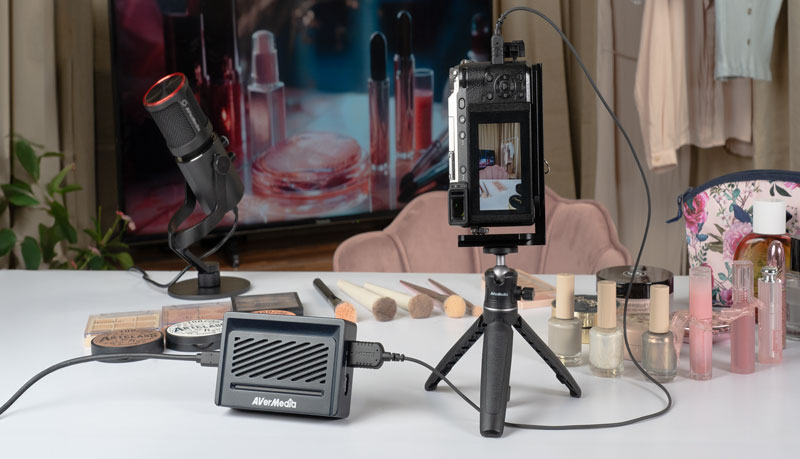
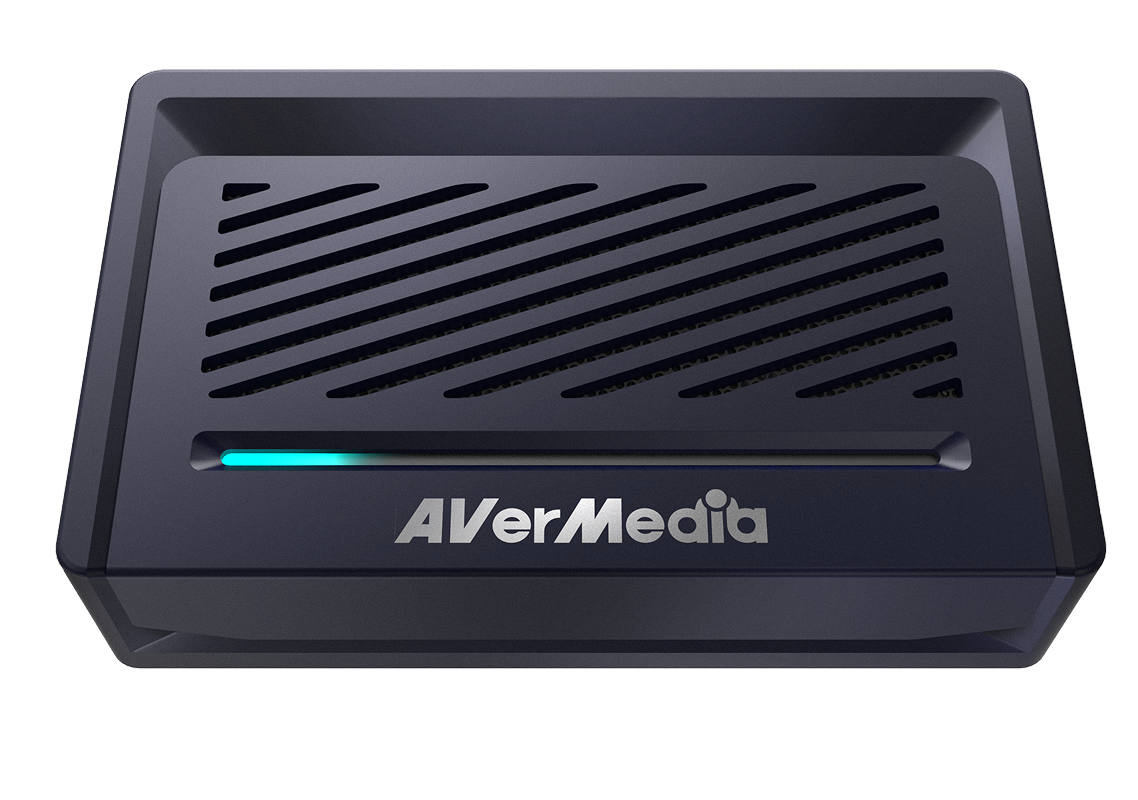
Für zuverlässige Leistung entwickelt

Das GC531 vereint Langlebigkeit mit effizienter Wärmeableitung dank seines robusten Gehäuses aus einer speziellen Legierung und eines Belüftungsgitters. Es gewährleistet zuverlässige Leistung auch bei längeren Streaming- und Aufnahmesitzungen und sorgt so für einen reibungslosen Workflow mit stabiler Videoübertragung und gleichbleibender Aufnahmequalität.

Realistische Farben in 2K30

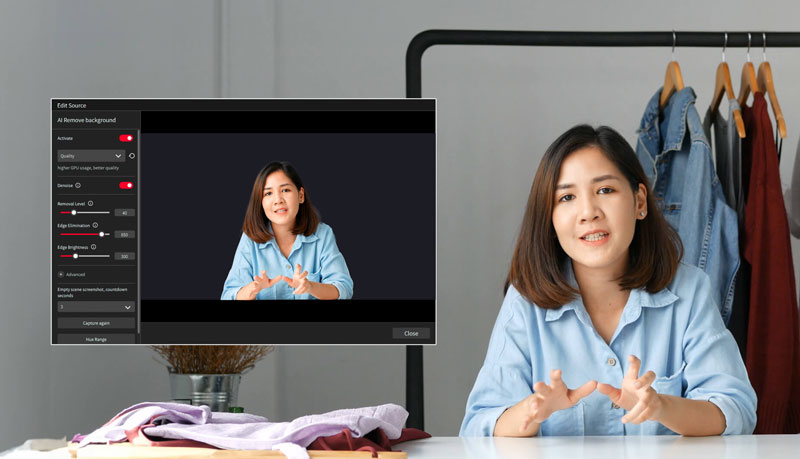
Genießen Sie lebendige, natürliche Bilder mit RGB24-Farbunterstützung bis zu einer Auflösung von 2K30. Die Farbwiedergabe ist klar und konsistent – für fesselnde Streams und Aufnahmen.
Streaming Center
Streaming Center

Streaming Center –
Intelligenter streamen, nicht komplizierter

AVerMedia Streaming Center ist ein praktisches All-in-One-Tool, das Videoaufnahme und Kamerasteuerung in einer leistungsstarken Software vereint. Es optimiert Ihre Arbeitsabläufe und macht Live-Streaming einfacher. Für weitere Informationen klicken Sie hier .

Universelle Kameraunterstützung

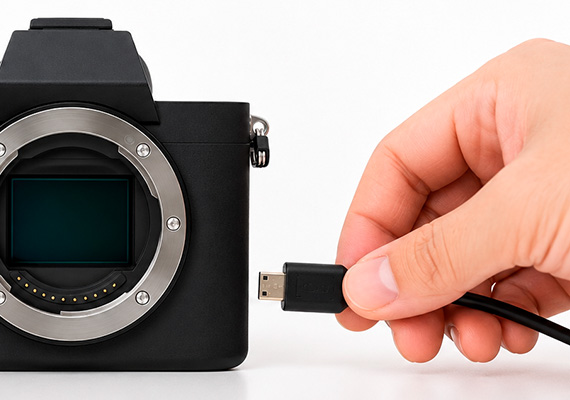
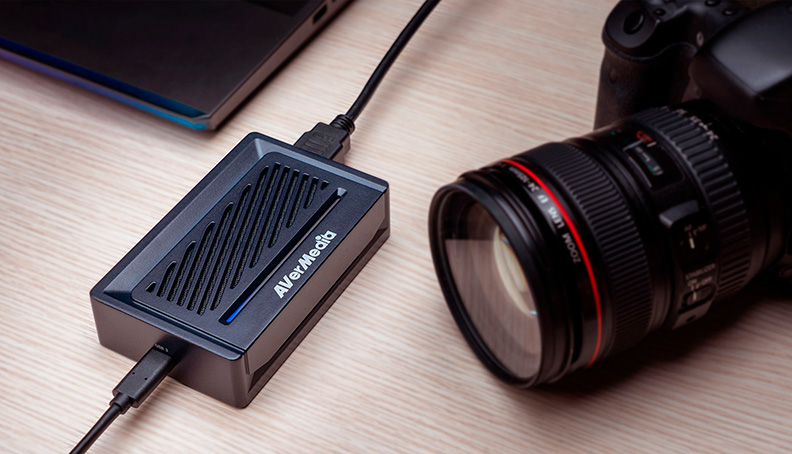
Der GC531 wurde für professionelle Live-Commerce- und Filmproduktionen entwickelt und lässt sich nahtlos in eine Vielzahl modernster Kameras integrieren. Profitieren Sie von flexibler Einsatzmöglichkeit und zuverlässiger Kompatibilität mit den gängigsten Kamerasystemen.
Streaming Center

Unkomplizierte Einrichtung

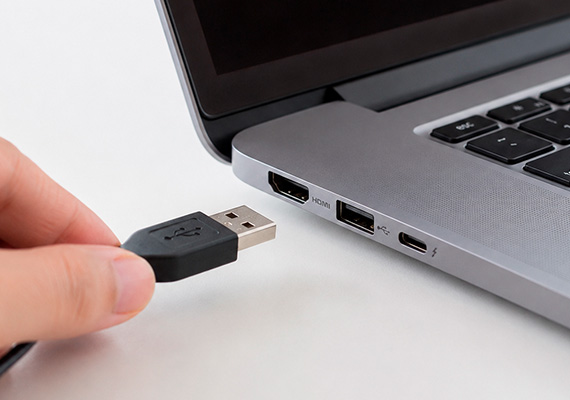
Dank fortschrittlicher UVC-Technologie lässt sich der STREAMER ULTRA unter Windows und Mac besonders einfach einrichten.
Schließen Sie Ihren GC531 einfach an Ihren PC oder Mac an, und schon können Sie mit dem Aufnehmen und Streamen beginnen.

  • Mit Computer verbinden

  • Mit Kamera verbinden

  • Mit Monitor verbinden

  • Zu den Favoriten im
    Streaming Center hinzufügen

Technische Daten Streamer ULTRA - GC531
  • Schnittstelle: USB 3.2 Gen 1 Typ-C (5 Gbit/s)
  • Ein- und Ausgänge (Passthrough): HDMI 2.0
  • Maximale Aufnahmeauflösung: 2160p30, 1440p60, 1080p120, 1080p60 HDR
  • Unterstützte Auflösungen: 2160p, 1440p, 1080p, 1080i, 720p, 576p, 480p (Mehr erfahren)
  • Maximale Passthrough-Auflösung: 2160p60, 1440p144, 1080p240, mit VRR, HDR
  • Videoformat: RGB24, YUY2, NV12, P010
  • Abmessungen (B x T x H): 113 x 70 x 28 mm
  • Gewicht: 192 g (6,77 oz)
Systemvoraussetzungen Windows ® 10 x64 / 11 x64 oder höher
  • Desktop-PC:
    - Intel ® Core™ i5-6XXX / AMD Ryzen™ 3XXX oder höher
    - NVIDIA ® GTX 1060 / AMD RX 5700 oder höher
  • Laptop:
    - Intel ® Core™ i7-7700HQ + NVIDIA ® GeForce ® GTX 1050Ti oder höher
    - 8 GB RAM empfohlen (Dual-Channel)

macOS 13 / 14 oder höher

Hinweis: Der GC531 unterstützt kein USB 2.0.

  • Intel Core i7 Quad-Core 3,6 GHz
  • Radeon Pro 555 mit 2 GB VRAM
  • 16 GB DDR4-Arbeitsspeicher (2400 MHz)
Lieferumfang:
  • STREAMER ULTRA (GC531)
  • USB 3.2 (Gen 1) Typ-C auf Typ-A Kabel
  • HDMI 2.0 Kabel
  • Schnellstartanleitung

*Änderungen der Spezifikationen vorbehalten.

FAQ

Party Chat
Switch 2
Audio
Micro SD Card
VRR
Troubleshooting
疑難排解
Settings
MAC M1
How do I start to use the Device
Software Usability
Hardware usability
Features/Functions
OBS
Chromebook
Windows
Mac OS
セットアップ
セットアップ・仕様
接続機器・設定
4K / HDR対応
VRR対応
音声端子
仕様
仕様・ソフト
仕様・ソフト(コントロール部)
仕様・ソフト(ミキサー部)
ストレージ
(PCモード)仕様・ソフト
(単体モード)仕様・設定
録画
配信
実況
再生
再生・編集
編集
Mac対応
相性
動画編集ソフト
ファイル管理
アップロード
ソフト
購入前のお問合せ
F225本体・付属品
セットアップ、Wi-Fi接続
テレビ視聴、設定画面
録画、予約録画、録画再生
アプリ
番組表
通信
設定
その他
困った時は
更新
EOL All
Streaming
Capturing
All Topics
Recording
Storage
Indicator Light
File management
Voice Commentary
GameMate
Upload
Playback & Video Quality
Editing & Converter
Live Stream
Installation
Watching TV
Stream Engine
Comparison Chart
What is the supported passthrough and capture resolutions and frame rates for GC531? Why do I only see a black screen in the software preview with no error messages? Why is my preview video and audio out of sync/desync/audio latency or delay on Windows?(QR) Why is there no game audio in both the software preview and my recorded videos? In multiple scenes of OBS, how to fix black screen when use AVerMedia capture card ? Why is the audio stuttering, cracking, or choppy in the software preview? My capture device cannot be detected when it is connected to the android phone, but everything goes fine on the PC. How can I solve it? Device connection keeps saying no input signal, how can I fix it? (QR) What should I do if my USB capture device cannot be found?
Mehr anzeigen

DOWNLOAD

RECentral(Mac)
Application
Application(macOS)
Application(Windows)
Assist Central
Assist Central Pro(Mac)
Assist Central Pro(Win)
CamEngine(Chrome)
CamEngine(Mac)
CamEngine(Win)
Certificates
Compatibility Tool
Connect(Mac)
Connect(Win)
Datasheet
Diagnosis Tool(Win)
Download Manager
Driver
Firmware
Firmware(Mac)
Firmware(Win)
Plugin(macOS)
Plugin(Win)
Quick Guide
RECentral (Win)
Streaming Center(Win)
User Manual
Utility
Utility (Chromebook)
Utility & FW(macOS)
Utility & FW(Windows)
Utility(macOS)
Utility(Windows)

Date : 2026-05-27 00:00:00

Version:AVerMedia Streaming Center (Win) v1.8.22.2

Purpose: Streaming & Recording

OS:Win10 x64, Win 11

Description:


1. Added support for Voice Mode.

2. Fixed an issue where the audio devices for GC573 and GC570D might function abnormally when no video input signal is detected.

3. Fixed an occasional audio loss issue when enabling microphone monitoring or switching profiles.

4. Fixed an occasional software hang issue during the first launch after a system reboot.

5. Optimized fullscreen playback and preview performance.

Date : 2026-02-03 00:00:00

Version:AVerMedia Streaming Center (Win) v1.7.4.1
Purpose: Streaming & Recording

OS:Win10 x64, Win 11

Description:

1. Kick CDN Support: Integrated support for Kick streaming.

2. Audio Monitoring: Enabled by default for all capture devices.

3. AV1 & NVIDIA Super Resolution: Now supported for recording and streaming.

   Supported Models: GC553G2, GC575, GC573, GC553Pro, GC551G2.

4. New Aspect Ratios: Added support for 21:9 ultra-wide recording and portrait (9:16) streaming.

5. HEVC Encoder Support:

    SDR → YouTube

    HDR → YouTube / RTMP

6. Bug Fixes:

    Resolved crashes during Alt+Tab switching and Snapshot usage.

    Fixed blurry visuals when capturing Discord.

7. Optimized startup to prevent occasional black screens and audio anomalies.


See the new features in action:

Date : 2025-12-22 00:00:00

Version: Assist Central Pro v4.0.80
Purpose: Configuration & Update
OS : macOS 15, macOS 26
Description: 
1. Added support for German, Spanish, Russian, French, Korean, and Thai interface languages.
2. Fixed an issue where some devices weren’t being detected or were showing up incorrectly.
3. Fixed an issue on macOS where GC313Pro couldn’t retrieve firmware version information correctly.

Date : 2025-12-22 00:00:00

Version: Assist Central Pro v4.0.80

Purpose: Configuration & Update

OS : Win10 x64,Win 11

Description: 

1. Added support for German, Spanish, Russian, French, Korean, and Thai interface languages.

2. Added PCIe information display to the GC573 settings page.

3. Fixed an issue where some devices weren’t being detected or were showing up incorrectly.

4. Fixed a rare issue where GC553G2 and GC575 lights couldn’t be controlled through Assist Central Pro on certain PCs.

Date : 2025-08-14 00:00:00

Version:AVerMedia Streaming Center (Win) v1.6.65.1
Purpose: Streaming & Recording

OS:Win10 x64, Win 11

Description:

New Features

1.Added support for zoom, screenshot, and full-screen preview for more flexible operation.

2.Added hotkey function to start streaming or quickly perform common actions with hotkey.

3.Added stream quality display and detailed streaming platform settings, including privacy options, for more precise control over streaming status.

4.Added HDR brightness adjustment for more refined image colors.

5.Added VSync toggle for a smoother viewing experience.


UI and Stability Improvements

Optimized UI interface, and improved audio monitoring function and overall stability.


See the new features in action:

Date : 2025-07-22 00:00:00

Version: Assist Central Pro v4.0.73
Purpose: Configuration & Update
OS : macOS 14, macOS 15
Description: 
1. Support for EDID Merge, Copy, and Internal mode changes has been added for the following models:
GC515, GC553G2, GC553Pro, GC575, GC571, GC573, GC570D
Support for EDID Merge and Internal mode changes has been added for GC551G2 (requires firmware ver. 1.2.6.1)  
*Note: For more information on EDID modes, refer to this FAQ
2. Fixed issue: When Nintendo Switch 2 was set to 1440p60
and when GC551G2 passthrough was connected to certain monitors, Assist Central Pro displayed incorrect input resolution.

Date : 2025-07-22 00:00:00

Version: Assist Central Pro v4.0.73
Purpose: Configuration & Update
OS : Win10 x64,Win 11
Description:
1. Support for EDID Merge, Copy, and Internal mode changes has been added for the following models:
GC515, GC553G2, GC553Pro, GC575, GC571, GC573, GC570D
Support for EDID Merge and Internal mode changes has been added for GC551G2 (requires firmware ver. 1.2.6.1) 
*Note: For more information on EDID modes, refer to this FAQ
2. Fixed issue: When Nitendo Switch 2 was set to 1440p60 and when GC551G2 passthrough was connected to certain monitors, Assist Central Pro displayed incorrect input resolution.

Date : 2025-07-10 00:00:00

Version: StreamingCenterPLUG V2.4.14

Purpose: Plugin for OBS Studio

OS:Win10 x64, Win11

Description: User Experience Optimization


Note: This plugin is designed for OBS Studio. You only need to install it if you plan to use OBS Studio with this plugin.

Date : 2025-02-13 00:00:00

Version: StreamingCenterPLUG V2.1.8

Purpose: Plugin for OBS Studio

OS:Win10 x64, Win11

Description:

1 Requires OBS Studio version 30.2 or later.

2 AVerMedia Center Upgrade: Includes AVerMedia features and works within OBS Studio.

3 Supported Devices: GC553Pro, GC553G2, GC575, GC515, GC535, GC531.

4  Supports 5.1 Multichannel Audio Capture: GC553Pro, GC553G2 (Firmware v1.0.7.7 or later), GC575 (Firmware v1.1.6.12 or later)


Note: This plugin is designed for OBS Studio. You only need to install it if you plan to use OBS Studio with this plugin.


Mehr anzeigen
×
  • Über uns
    • Über AVerMedia
    • Kontakt
    • 投資人關係
    • ESG & CSR
  • Medien
    • News & Presse
    • Medien-Rezensionsartikel
    • Creator-Bewertungsvideos
    • Offizielle Produktvideos
    • Produkt-Tutorial-Videos
    • Award
  • Support
    • Downloads & FAQ
    • Technische Unterstützung
    • Garantie und Kundendienst
    • Hier erhältlich
    • EOL
  • Andere
    • Blog
    • Workspace
    • Store
    • Store
    • Geschäftsanfrage
    • AVerMedia Member Club
    • AVerMedia Partner Portal
    • Strategischer Partner
    • TAA Compliance
    • NDAA Compliance
    • Datenschutzrichtlinie
    • Nutzungsbedingungen
    • MEET ELENA
    • Cookie Settings
fb
linkedin
twitter
youtube
reddit
Language
Copyright © AVerMedia.
  • Produkte
    • Webcams
      • 4K UHD
      • 1080 FULL HD
      • Kits
    • Capture
      • 4K Capture
      • 1080p60 Capture
      • AV / S Video Capture
      • DSLR / CAMCORDER CAPTURE
      • Video Converter
    • Audio
      • Freisprecheinrichtung
      • Soundbars
      • Mikrofone
      • Drahtloses Mikrofon
      • Zubehör
    • Control Center
      • Creator Central
    • Video Bar
      • Mingle Bar
    • Streaming-Erweiterungsstation
      • Videoprodukt
      • Audioprodukt
    • Software
      • Streaming-Software
  • Arbeitsbereich
    • Workspaces
      • Products of the Month
      • Game Streamer
      • Video Content Creator
      • Work From Home
      • Education
      • How To
      • Corporate
  • Betreuung
    • Support
      • Downloads & FAQ
      • Technical Support
      • Warranty & RMA Services
      • Where to Buy
      • Zertifizierung
  • Shop
  • Store
  • Integrierte KI-Systeme
  • Über AVerMedia
    • Über AVerMedia
      • Über AVerMedia
      • Kontakt
      • 投資人關係
      • ESG & CSR
      • Recruiting
Language