

•Long Switch 2 gaming sessions can drain your battery fast, GC313Pro keeps you powered while you play and record. •4 ports: USB-C (video in + charge), USB-A, HDMI out, USB-C (PC connect) •Records up to 1080p60, supports up to 4K60 video output to your screen, and includes a USB-C cable that supports USB 3.2 Gen2 (10Gbps) speeds.
ELENA is back with another recommendation!
Has everyone been playing games lately? I've been hooked on that building game on Switch 2 lately. The only problem? My battery disappears in about 3 hours.
Luckily, I’ve got the GC313Pro that handles charging, capture card, USB expansion, and HDMI output all packed into one dock.
Basic Features of GC313Pro – Learn more
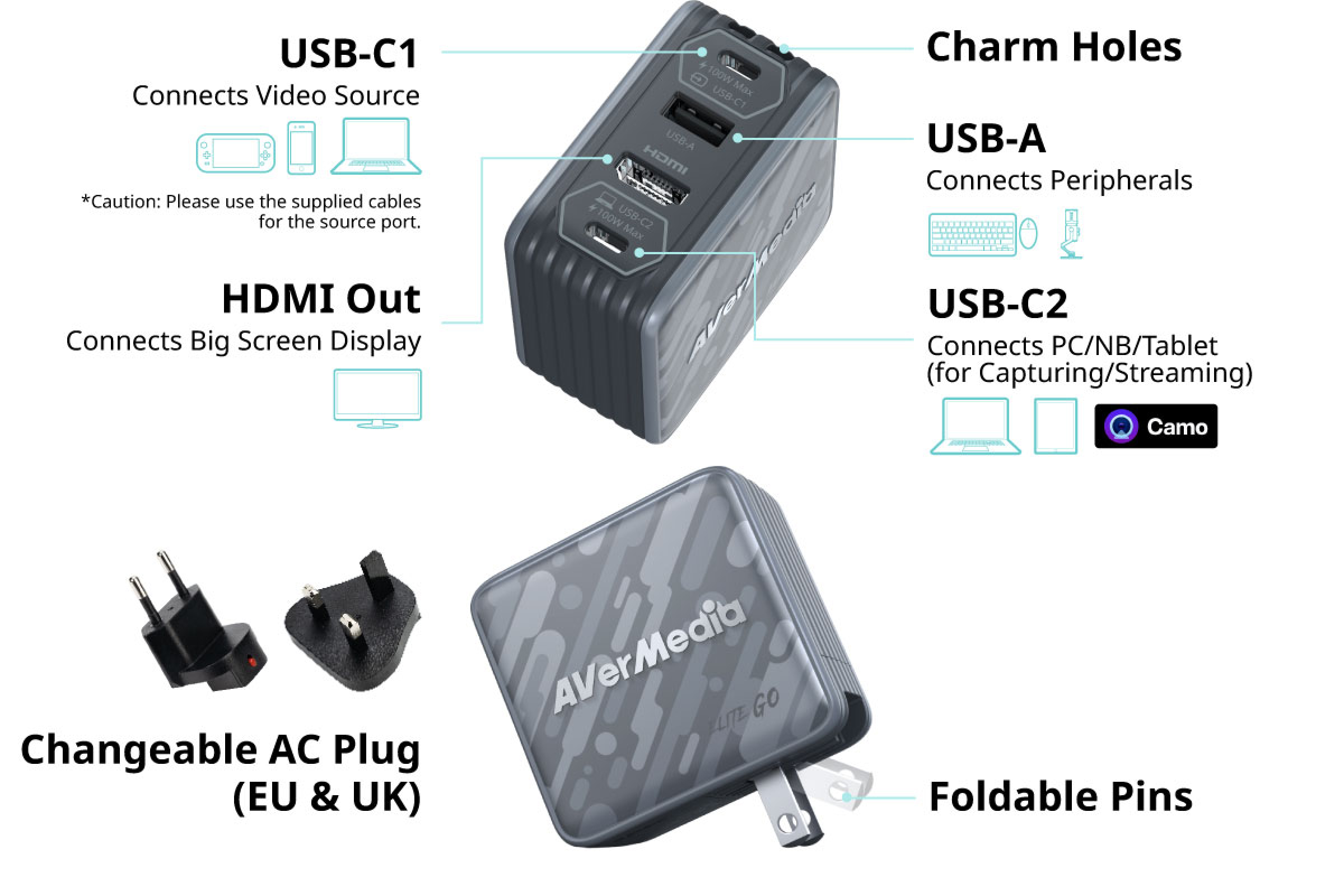
First, let's take a quick tour of the ports. Despite its compact size, the GC313Pro packs everything you need into one device:
- • Type-C for charging and video input
- • USB Type-A port for peripheral device connection
- • HDMI for video output
- • Type-C for charging and PC connection
Who Is the GC313Pro For?
If you play on console, capture gameplay occasionally, and hate cable clutter, GC313Pro is for you. You can leave everything connected and keep using charging and HDMI pass-through even when you're not recording. Honestly, it's so convenient that I'd rather bring this one device than a bag full of adapters.
GC313Pro Charger Specifications
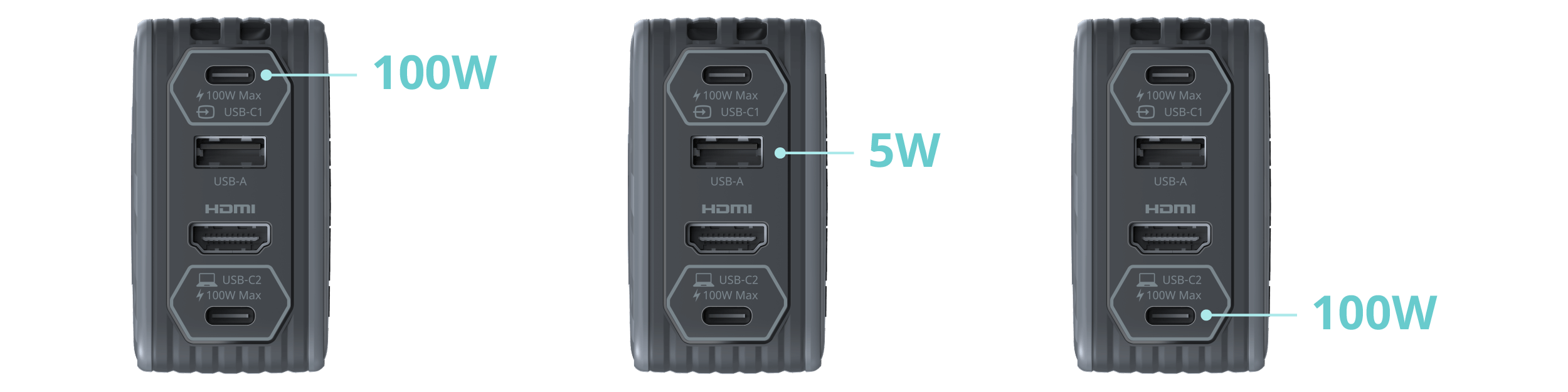
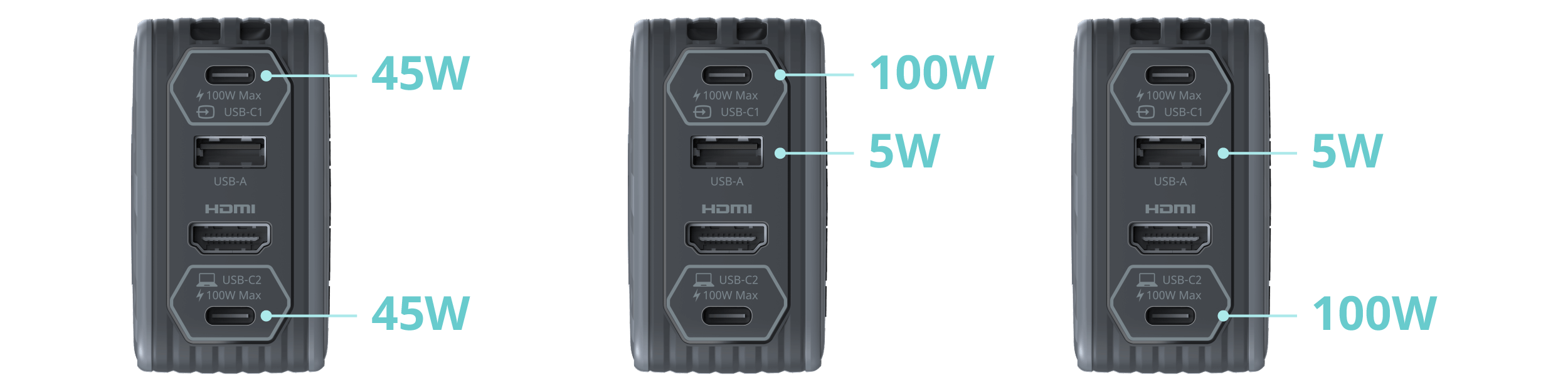
The GC313Pro supports PD 3.0 fast charging with up to 100W output and can charge up to three devices at once. Whether it's a laptop, tablet, or Nintendo Switch, there's plenty of power to go around. I've been playing that building game for hours while charging, and battery anxiety is a thing of the past.

GC313Pro Capture Specifications
Here’s the part that actually makes this different from a regular GC313 and others USB-C hubs:
- • USB-C (DP Alt Mode) video input
- • 4K60 pass-through
- • 1080p60 recording
- • YUY2 / MJPEG video formats
It supports up to 4K60 HDMI output while capturing gameplay at up to 1080p60. Plus, the built-in USB hub means you can plug in a mic and turn it into a mini streaming setup.
You can stream using:
- • Streaming Center (PC)
- • Live Streamer (Phone / iPad)
The coolest part? You can dock your Nintendo Switch, connect a mic and iPad, and stream without needing a PC at all.
FAQ
Q: What’s the difference between GC313 and GC313Pro?
A: Both GC313 and GC313Pro support 100W GaN charging, 4K60 video pass-through, and USB hub functionality. GC313Pro also adds built-in 1080p60 gameplay recording for creators and streamers.
Q: Can GC313Pro charge Nintendo Switch 2?
A: Yes. GC313Pro supports USB PD fast charging and helps keep your Nintendo Switch 2 powered during long gaming sessions. Charging performance may vary by device, cable, and usage.